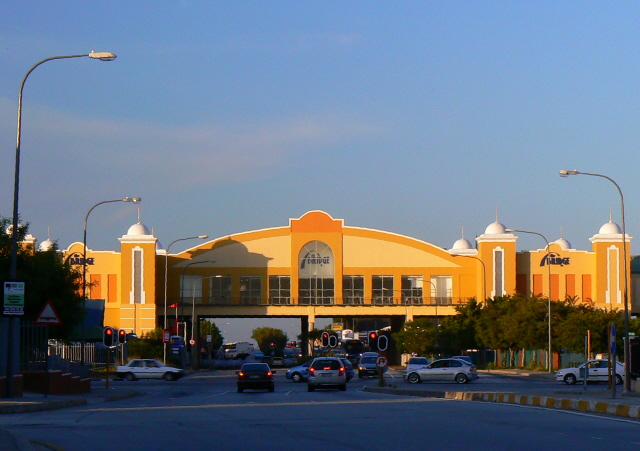
 This is the Bridge Shopping Mall, built in the 80’s, which forms a bridge over a major arterial road leading down to the Northern Areas of PE. If you click and enlarge, you will see the name emblazoned on the building, and a bus which has just driven through under it. The cars travelling left to right are on the Old Cape Road, which used to be the main road to Capetown , until the freeway was completed about 40 years ago.
When you are inside the mall, you are totally unaware of being on a bridge, unless you make a point of walking through a bunch of fast food places and stand at the front windows.
Other participants in the Bridge Theme:
Boston (MA), USA – San Diego (CA), USA – Stayton (OR), USA – New York City (NY), USA – Portland (OR), USA – Montego Bay, Jamaica – Inverness (IL), USA – Singapore, Singapore – Stockholm, Sweden – Setúbal, Portugal – Brussels, Belgium – Phoenix (AZ), USA – Seattle (WA), USA – Hyde, UK – Manila, Philippines – Fort Lauderdale (FL), USA – London, England – Austin (TX), USA – Toulouse, France – Weston (FL), USA – Sesimbra, Portugal – Selma (AL), USA – Silver Spring (MD), USA – Saarbrücken, Germany – Cleveland (OH), USA – Crystal Lake (IL), USA – American Fork (UT), USA – Seoul, South Korea – Kyoto, Japan – Tokyo, Japan – Norwich (Norfolk), UK – North Bay (ON), Canada – Arradon, France – Paderborn, Germany – Durban, South Africa – Philadelphia (PA), USA – Cypress (TX), USA – Cottage Grove (MN), USA – Prague, Czech Republic – Portland (OR), USA – Greenville (SC), USA – Boston (MA), USA – Port Angeles (WA), USA – Kuala Lumpur, Malaysia – Wichita (Ks), USA – Saint Paul (MN), USA – Petaling Jaya (Selangor), Malaysia – Grenoble, France – New York City (NY), USA – Nottingham, UK – Hobart (Tasmania), Australia – Arlington (VA), USA – Minneapolis (MN), USA – Miami (FL), USA – Cheltenham, UK – Albuquerque (NM), USA – Saratoga Spgs. (NY), USA – Las Vegas (NV), USA – Tuzla, Bosnia and Herzegovina – Nashville (TN), USA – Toruń, Poland – New Orleans (LA), USA – Port Elizabeth, South Africa – Melbourne, Australia – Moscow, Russia – Trujillo, Peru – Château-Gontier, France – Quincy (MA), USA – Melbourne, Australia – Port Vila, Vanuatu – Joplin (MO), USA – Bellefonte (PA), USA – Brookville (OH), USA – Chateaubriant, France – Chandler (AZ), USA – Stavanger, Norway – Baziège, France – Auckland, New Zealand – Wellington, New Zealand – Ocean Township (NJ), USA – Subang Jaya (Selangor), Malaysia – Detroit (MI), USA – Riga, Latvia – Nelson, New Zealand – Budapest, Hungary – Cape Town, South Africa – Sydney, Australia – Dunedin (FL), USA – Sofia, Bulgaria – Radonvilliers, France – Turin, Italy – Montpellier, France – Kansas City (MO), USA – Minneapolis (MN), USA – Haninge, Sweden – Wailea (HI), USA – Lubbock (TX), USA – Rabaul, Papua New Guinea – Terrell (TX), USA – Mexico City, Mexico – Saint-Petersburg, Russian Federation – Budapest, Hungary – Montréal (QC), Canada – Sharon (CT), USA – Le Guilvinec, France – Jefferson City (MO), USA – Saigon, Vietnam – London, UK – Crepy-en-Valois, France – Orlando (FL), USA – Maple Ridge (BC), Canada – Paris, France – Mainz, Germany – Newcastle (NSW), Australia – Wassenaar (ZH), Netherlands – Menton, France – Monte Carlo, Monaco – Darmstadt, Germany – Naples (FL), USA – Torino, Italy – Saint Louis (MO), USA – Bogor, Indonesia – The Hague, Netherlands – Minneapolis (MN), USA – Anderson (SC), USA – Melbourne (VIC), Australia – West Sacramento (CA), USA – Christchurch, New Zealand

 Firefly the Travel Guy
That is a different approach. I like it. 16 Ghosts on Bridge
LikeLike
WOW, I have never heard of a “Bridge Shopping Mall” That would really be interesting to visit but that would be a long travel from me since I live in the state of Georgia. You have me to wondering now if there is such a mall in the United States. I guess I need to go Google and see. Thanks for visiting my blog. I scrolled down and glanced at your other pictures. They are all beautiful. I will be back to visit again so I won’t miss out on your wonderful blog.
LikeLike
Great! A mall that serves as a bridge!
LikeLike
That’s neat. You have captured it beautifully. I never saw a mall that looked so pleasing. That’s a great use of space, too.
LikeLike
Great shot! A mall that serves as a bridge that’s different!Have a nice weekend!
LikeLike
Interesting, a mall that has a dual purpose as a bridge.
LikeLike
Well, this is something different. I’ve seen shops on bridges – over autoroutes, for instance, but never a complex like this. Nice colours too. Good and interesting choice for today’s theme.
LikeLike
That certainly is a “Bridge over troubled waters” – if the traffic is as expected.PS Thank you for nice comments on my blog. If you do a search with “bridge” as a keyword, I think you’ll find something.
LikeLike
oops – I posted my comment on your yesterday’s post!
LikeLike
An astonishing bridge which resembles no and which benefits from a beautiful light
LikeLike
That is a beautiful mall! Do you go there much?joyNorwich Daily PhotoThe Goddess In YouYour Love Coach
LikeLike
Basically road under the mall? How interesting!
LikeLike
That’s very nice and colourful
LikeLike
Sort of an updated version of the Ponte Vecchio in Florence, which is the “gold standard” for shop-lined bridges, I guess 🙂
LikeLike
Cool mall. There is a McDonalds in Oklahoma that is over the interstate like your mall. I like your header photo.
LikeLike
Hello Sam,Thanks for visiting and commenting on my blog. It’s very late here now and I am very tired, but I wanted to answer your question about the photo sizes. Click here to see a graphic that describes how I do it. It’s very simple, really. This should work. If it doesn’t, let me know. The photos I upload are at least 1200 pixels wide, btw.Your photos are simply splendid. I will come back later to look at them with more time. Have a nice Sunday.
LikeLike
thanks all. Joy… not if i can help it! I hate malls and crowds!Fenix, thanks so much, will try it out and let you know.
LikeLike
fenix, ok checked the link. that is what i have been doing, but the photos come up as little red crosses on the blog, and if you right click on show picture, they don’t work. Anyway have a good sleep, and hopefully will chat later!
LikeLike
And mall inside a bridge…never seen before..and the colors are very warm….good ideaThank you for your visit.
LikeLike
Somehow I missed this unique post yesterday. Good shot! There are similar structures over a freeway on the way to Chicago, but I’ve never stopped.
LikeLike
LOVELY colors in this, so bright and cheery! Nice capture!
LikeLike
I have seen similar Bridge Malls over interstate highways in the US. Also, the food court concept sounds universal.
LikeLike
Sam, have you tried enlarging each photo manually? Working in the composition window, you click the photo first, position the pointer on the right hand upper corner little white square and it will change into a double headed arrow, now click and drag to stretch the image. Save and preview. If this works then you may have to change a value in the template. Let me know.
LikeLike
hi fenix, thanks again for the help! I tried the dragging, it worked from a size point of view, but the picture showed up as pixellated and very poor quality. I was thinking that somewhere in the minima stretch template design, there must be a code that sets the default for the picture width at 400, and we need to change it to 600 or 700, but I wouldn’t know where to start! I am a real cyber-dinosaur i’m afraid!
LikeLike
OK, go to settings, edit html, backup template then check the box to the left of “Expand Widget Template” and do a search for “outer-wrapper { width:” then change the “width:” value from whatever it is to 960px (write down what the value you are replacing is). Preview. If it looks OK, save and see what happens. If it doesn’t, undo the changes.I hope this works!(You will have to manually change the size of each photo from 400 to 720 in the html composition window anyway, every time you upload.)
LikeLike
A much more interesting approach to this theme day. Excellent shot
LikeLike
Thanks Fenix, it worked, but I don’t know why! The size was 73%, not a fixed number. I tried the 960px, and the whole body filled the page and killed my sidebar. I went to 720, and it still had no sidebar, although there was space for it. So I reverted to the 73%. Then I tried fiddling with the picture code again, and when I made it 720, it worked! (I had been trying round numbers like 600, 700 etc, so don’t know if it is because 720 is a magic number?!! Anyway thanks a stack, and at least we will be able to see PE a bit better now.
LikeLike
BTW, I fixed the latest photo (4th December) and added a bonus one to road-test it.
LikeLike